 Vinci
DaVinci Resolve on any Linux distro.
Vinci checks your computer, installs Resolve in an isolated container with full GPU acceleration, and converts the videos Resolve can't open on Linux. No terminal, and no changes to your system libraries.
Free and open source (GPL-3.0). x86_64 · Ubuntu, Fedora, Arch, openSUSE, Mint, Pop!_OS, Bazzite and more. Unofficial project, not affiliated with Blackmagic Design.
Three steps
DaVinci Resolve is only officially supported on Rocky Linux. Vinci gives it a stable, controlled environment, a pinned Ubuntu 24.04 container, so it behaves the same on every distro.
Check
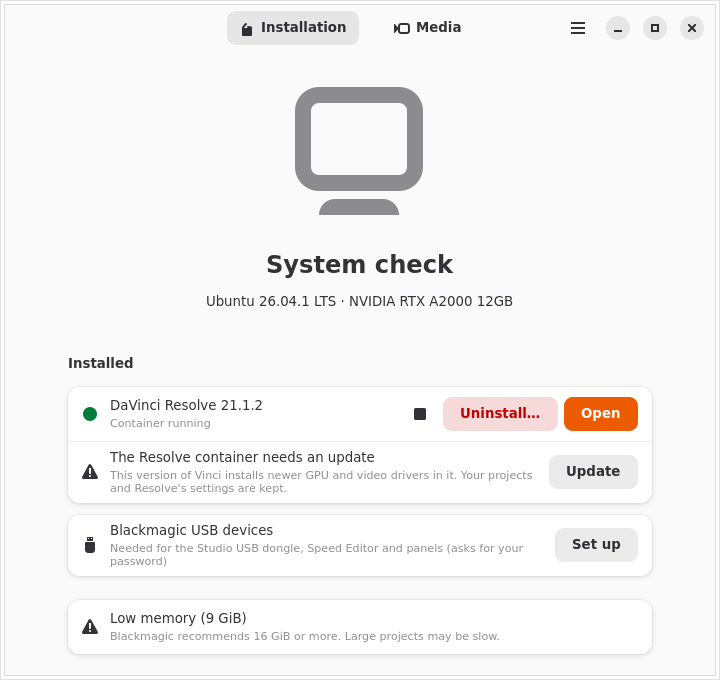
Vinci looks at your GPU, driver, memory and free disk space and explains in plain words what will work and what may not.
Download
Get the free or Studio installer from Blackmagic Design's website. Vinci finds it in your Downloads folder automatically, even while it is still downloading.
Install
With one click, Vinci prepares podman and distrobox, builds the container, installs Resolve and adds it to your app menu. Then just open it.
Everything Vinci does
An installer that keeps looking after Resolve once it is installed.
System check
GPU, driver, RAM (8 GiB minimum, 16 GiB recommended) and disk (12 GiB minimum, 40 GiB recommended). It only blocks what certainly won't work; for anything else, it warns you and lets you decide.
Isolated container
Resolve runs in Ubuntu 24.04 through distrobox and podman, sharing your home folder. Your system libraries are never touched.
Full GPU acceleration
NVIDIA through your system driver (CUDA), AMD through ROCm and Intel through the NEO runtime. Hybrid laptops use the dedicated GPU, and you can switch it in Preferences.
Finds the installer
It detects the Free and Studio installers in Downloads, or opens Blackmagic's page and waits for the file. Before installing, it warns you about versions with known problems.
Desktop integration
A menu entry with an icon, .drp/.drt files that open in Resolve,
and Blackmagic's broken utility shortcuts tidied away.
Sound that works
Audio goes from the container straight to your desktop's PipeWire session, so Resolve plays sound like any other app.
Media conversion
Converts phone and camera footage into formats Resolve opens on Linux, and turns your renders into MP4. GPU-accelerated when available, with an automatic CPU fallback.
Watch folders
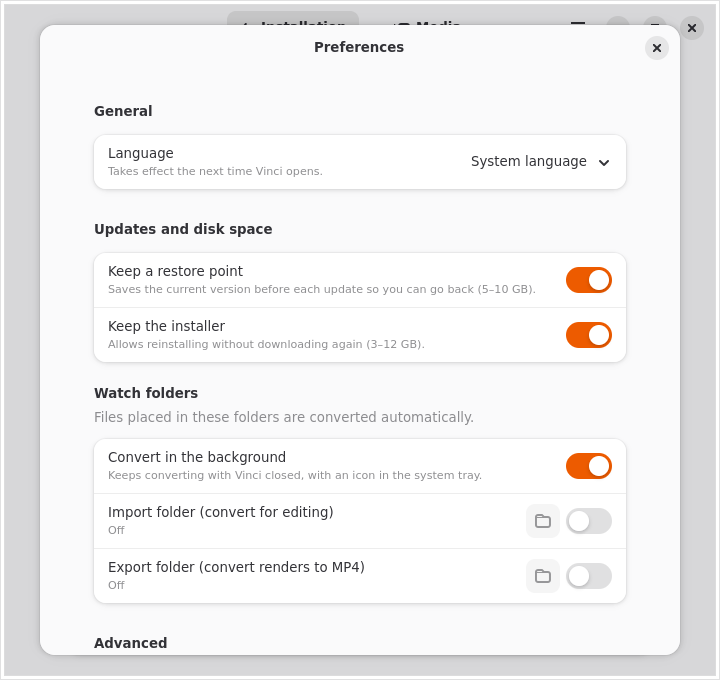
Drop files into a watch folder and they are converted in the background, with a tray icon and notifications, even with Vinci closed.
Lives in the tray
Closing the window keeps Vinci in the system tray, one click away. It asks the first time, and you can change your choice in Preferences.
Updates itself
When a new version of Vinci is out, a bar at the top says so. One click downloads it, checks it and restarts into it.
Self-diagnosis and repair
Every time it opens, Vinci checks the container, menu entry, GPU and driver. If something is wrong, the “Repair” button fixes it.
Restore point
Before each update, Vinci saves the current version (5–10 GB), so “Go back to this version” undoes a failed update in seconds.
Updates
It tells you when a new Resolve version is out and updates it in place, along with the container's GPU and video drivers. Projects and settings are always kept.
Free and Studio
Both editions are supported, and Studio can be activated with a license key or a USB dongle. Switching editions installs into a new container and offers to remove the old one.
Blackmagic hardware
Safe udev rules for the Studio dongle, Speed Editor and control panels, limited to Blackmagic devices.
Clean uninstall
Removes only what Vinci installed. Your projects stay unless you tick “delete them too”, and podman is kept if other containers use it.
Container terminal
For advanced users: a terminal inside Resolve's container, clearly marked
⬢ vinci-free, and a button to open the installation folder.
Private by design
No telemetry, ever. Optional local logs hide your user name, and the “Copy diagnostic report” button makes reporting problems easy.
English and Portuguese
Follows your system language, which you can also choose in Preferences.
Built to last
A pinned container image and distrobox version, a declarative recipe and a weekly automated check of every external dependency. What is installed keeps working offline.
GPU support
Resolve needs a GPU with compute support. Vinci sets up the right components for yours.
| GPU | How | Status | Notes |
|---|---|---|---|
| NVIDIA | Your system's proprietary driver (CUDA), shared with the container | Tested | Install the proprietary driver on your system first; Vinci tells you if it is missing. |
| AMD | ROCm inside the container | Experimental | RDNA or newer; RDNA1/Vega with a compatibility override. Polaris and older are not supported. |
| Intel | NEO compute runtime (OpenCL) | Experimental | Arc and 12th-gen processors or newer. Blackmagic does not support Intel GPUs on Linux. |
Videos that just open
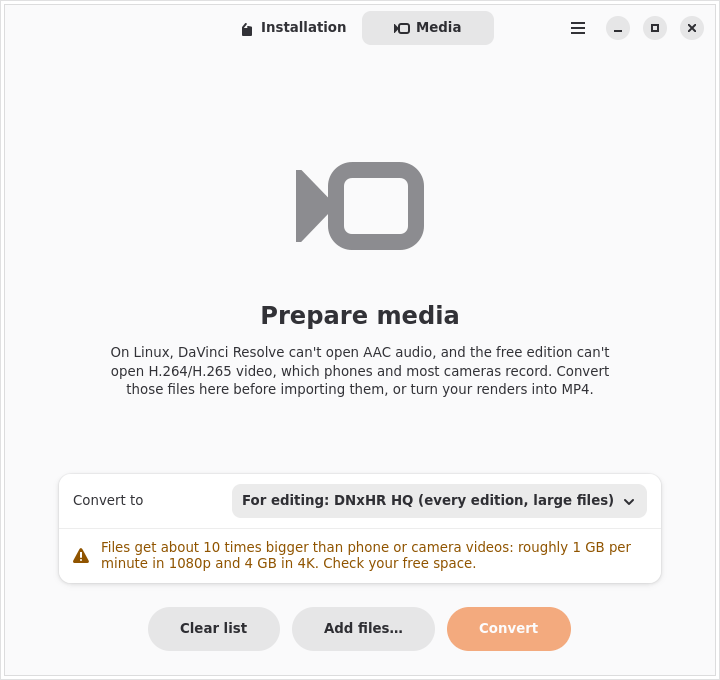
On Linux, Resolve can't read AAC audio in any edition, and the free edition can't open H.264/H.265, the formats used by phones and most cameras. Vinci converts them using the ffmpeg from Ubuntu's repositories inside the container.
| Preset | Use it for |
|---|---|
| DNxHR HQ | Editing in Free and Studio. Large files (about 1 GB per minute in 1080p). |
| ProRes 422 | Editing, when you prefer ProRes. Large files. |
| MPEG-4 (Diolinux preset) | Editing with much smaller files, every audio track kept. Optional size limit. |
| Fix audio only | Studio with NVIDIA: keeps the video and only converts the audio to PCM. |
| MP4 H.264 | Publishing your render (YouTube, web). |
| MP4 H.265 | Publishing with smaller files. |
Pick files in the Media tab, or set an import and an export watch folder in Preferences: anything dropped there is converted automatically into a subfolder, and the tray icon shows the progress.
Screenshots
A native GTK 4 and libadwaita app that fits right into GNOME, KDE, Cinnamon and other desktops.
Install Vinci
Vinci ships as an AppImage that runs on any distro with glibc 2.39 or newer. A Flathub release is planned.
- Download the AppImage.
- Make it executable: right-click → Properties → “Allow executing as program”, or:
chmod +x Vinci-*-x86_64.AppImage - Open it. Vinci adds a shortcut to your app menu so you can find it later.
Vinci installs podman (asking for your password) and a private copy of distrobox if your system doesn't have them. Nothing else is installed outside your user folder.
Requirements
- 64-bit PC (x86_64) with a supported NVIDIA, AMD or Intel GPU
- A Linux distro from 2024 or newer (glibc 2.39+)
- 8 GiB of RAM (16 GiB recommended)
- 12 GiB free disk space (40 GiB recommended)
- An internet connection for the first install
- The DaVinci Resolve installer from Blackmagic Design
Tested on Ubuntu and on Fedora with KDE Plasma (Wayland) and Cinnamon. Immutable systems such as Silverblue, Kinoite and Bazzite are also supported: Vinci detects them and adapts.
Questions
Does Vinci include DaVinci Resolve?
No. Vinci never downloads, bundles or redistributes Resolve. You download the official installer from Blackmagic Design's website and accept its license, and Vinci installs that file.
Is it free? Does it work with Studio?
Vinci is free software under the GPL-3.0. It installs both the free DaVinci Resolve and DaVinci Resolve Studio; Studio is activated with your own license key or USB dongle.
Does Vinci change my system?
Very little. Resolve and its libraries live in a container. On your system Vinci only installs
podman (if missing, with your confirmation), a private distrobox in
~/.local/share/vinci, a menu entry and, if you ask, udev rules for Blackmagic devices.
The uninstaller removes exactly that.
Where are my projects?
In the same place Resolve always keeps them, in your home folder, which the container shares. Updates and edition switches keep them, and so does uninstalling, unless you choose otherwise.
Does Vinci collect data?
No. It only contacts Blackmagic's public API to learn the latest Resolve version and this repository to read the list of versions with known problems. Logs are off by default and stay on your computer.
Something went wrong. How do I report it?
Use “Copy diagnostic report” in Vinci (it hides your user name) and open an issue on GitHub.